Some home directory dot files to be installed into a new user home directory.
 dblume
Oops, of course Blame is only for that file
221e73c @ 2023-12-17 11:09:53
dblume
Oops, of course Blame is only for that file
221e73c @ 2023-12-17 11:09:53
| .. | ||
|---|---|---|
| doc | Move vim gittab commands to a plugin | 2023-12-16 18:37:40 |
| plugin | Move vim gittab commands to a plugin | 2023-12-16 18:37:40 |
| LICENSE | Move vim gittab commands to a plugin | 2023-12-16 18:37:40 |
| README.md | Oops, of course Blame is only for that file | 2023-12-17 11:09:53 |


Vim Git-Tab
These are handy context-sensitive Git commands in Vim that load the results in a new tab. The commands infer what you want from the current filename and whether there's a commit hash under the cursor.
These commands are for investigating the history of files. They are:
-
Blame -
Log -
ShowandShowFile -
Diff
This simple plugin is enough to do 95% of the Git dives I do. If you still want to do even more with Git while in Vim, consider Tim Pope's comprehensive vim-fugitive.
Installation
Install into Vim's built-in package support:
mkdir -p ~/.vim/pack/plugins/start
cd ~/.vim/pack/plugins/start
git clone --filter=blob:none -b main --single-branch https://github.com/dblume/gittab
vim -u NONE -c "helptags gittab/doc" -c q
Common Use Example
Say you're on "index.html", and you need to know why a section looks the way
it does. Run :Blame to see a buffer of "git blame" open at the same line
where you are so you don't lose any context.
Or run :Log to see a list of only the commits that affect that file. This
is nice in a repo of thousands of commits, but only dozens are to this file.
If you see a commit of interest, move the cursor over it, and type :Diff to
see what changes were made by that commit, or :Show to see the full commit
description.
Then you can keep exploring, and each command infers what you want by which type of buffer you're in or what commit your cursor is on.
The Commands
When you're browsing a file in a Git repository, these commands provide a very simple and convenient flow for digging into their history.
All you have to know is Blame, Log, Show, and Diff.
The following image is an oversimplification, but shows that with the above four commands, one can easily and quickly navigate various views of a file and its commit history.
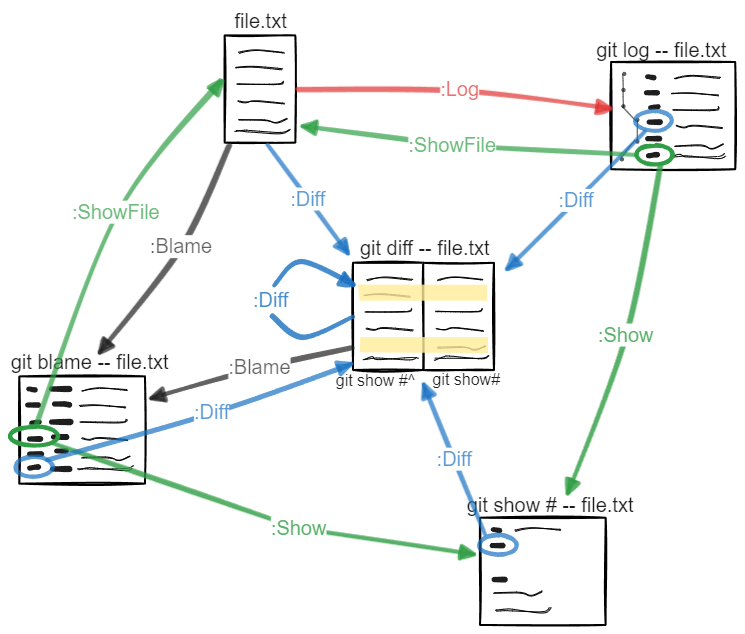
:Blame
When you're on a regular file or a :ShowFile buffer, opens up a git blame
buffer in a new tab and positions the cursor at the same relative spot in the
Blame buffer.
Example, run Blame on a :ShowFile buffer named "git show 1234abcd:README.md",
and you get a :Blame buffer named "git blame 1234abcd -- README.md".
:Log
When you're on a regular file or a :ShowFile buffer, opens up a git log
buffer in a new tab for the commits that affect only that file. By default,
runs log as:
git log --no-color --graph --date=short --pretty="format:%h %ad %s %an %d"
And you can pass in additional Git arguments like --all.
:Log --all
The reason Log defaults to one-line logs is because :Show and :Diff are so
easy to use to dive in deeper to the individual commits.
Handy arguments are --all, --merges, --date-order, --first-parent, and
--ancestry-path.
:Show and :ShowFile
These require the cursor to be positioned on a hash, so you'd most likely be
in a :Log or :Blame buffer when you want to use these commands.
When you're on a :Log or :Blame buffer :Show opens a buffer in a
new tab that shows the full commit message for the hash under the cursor.
:ShowFile opens a buffer in a new tab that shows the contents of the file
at the hash under the cursor.
Ex., If the cursor is on "1234abcd" on :Blame buffer git blame -- README.md
then:
| Command | Resultant Buffer |
|---|---|
| :Show | git show 1234abcd -- README.md |
| :ShowFile | git show 1234abcd:README.md |
:Diff
If you're on a regular file that's different from HEAD, :Diff will perform a
git diff on the file from HEAD. If it's the same as HEAD, then :Diff will
perform a git diff against that file's previous commit.
If the cursor is on a commit hash (as available on :Blame, :Log, and :Show
buffers), then :Diff will perform a diff against the previous commit to that
one.
If the active window is of a :Diff buffer, then :Diff will perform a
git diff of that buffer with that revision's parent.
Is it any good?
Yes.
The diagram was made with Excalidraw.
Licence
This software uses the MIT License