Some home directory dot files to be installed into a new user home directory.
 dblume
dark teal float windows; lsp clangd only if it exists
f5fe477 @ 2025-05-20 20:08:59
dblume
dark teal float windows; lsp clangd only if it exists
f5fe477 @ 2025-05-20 20:08:59
David Blume's dotfiles
These are some of David Blume's dot files to be installed in new user home directories.
Preview
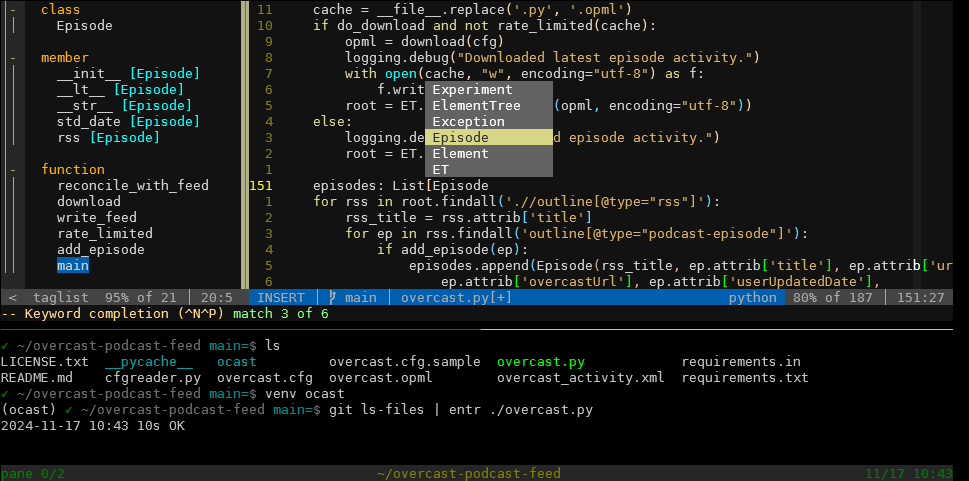
Here's a screen capture showing tmux, vim, and the shell preparing to run entr. (Because tmux+vim+entr is a great IDE.)
My vim config is light weight: no nerd fonts, no statusline plugin, no plugin manager, no file manager, etc. Yet it's full featured in that the status line shows nearly all the info of Powerline, and uses the built-in plugin manager and powers-up netrw, the built-in file explorer. It includes about five essential plugins.
The screen cap shows the tmux status line, the vim status line, taglist, and a vim popup menu.
Download the project
There are two remote repos:
- git.dlma.com: Click Download and select Download ZIP or Download TAR.
- GitHub: Click the green Code button and select Local -> Download ZIP
Install from CLI
Run the following:
~$ mkdir dotfiles
~$ cd dotfiles
dotfiles$ curl -L https://git.dlma.com/dotfiles.git/archive/HEAD.tar > dotfiles.tar
dotfiles$ tar -xvf dotfiles.tar
dotfiles$ rm dotfiles.tar
Then, when you run setup, it'll backup your changed files to backup_of_dotfiles_<date>
and replace them with the ones here. You can perform a dry run to see which files will
be changed by passing the "-n" parameter.
./setup -n
If you approve of the changes, then just run setup
./setup
See config.dlma.com for more.
What's installed
- .bashrc and .bash_profile
- Vim resources
- .vimrc
- An empty .vim_undo directory
- .vim with the following plugins:
- bbye for :Bdelete, to delete buffers without affecting windows.
- taglist, a ctags tree-view explorer.
- file-line, to open file:line as from a compiler error.
- visual-star-search, so * and # work in visual mode too.
- git-tab, use integrated context-sensitive git commands
- rainbow, for matching colored parentheses.
- tabular, for when aligning tables.
- Assorted favorite colors like desert.
- Neovim resources
- .config/nvim/init.vim
- .config/nvim/colors/nvim_desert.vim
- .local/share/nvim/site/plugin/ plugins
- bin directory with:
- set_colorscheme, a script to set the Catppuccin Mocha color scheme.
- archive_id, a script to archive your gpg secrets and .ssh keys
- .gitconfig and .gitignore
- Ghostty config in .config/ghostty/config
- .tmux.conf
- .inputrc, for vi mode and a partially matched command history traversal.
- .editrc, for vi mode and tab word completion in macOS.
- .ssh/config, for a fix for CVE-2016-0777. (Or upgrade to OpenSSH 7.1p2 released Jan 14, 2016 from http://www.openssh.com.)
- .ripgreprc, for ripgrep, or rg.
- .gdbinit
- .visidatarc, to hide visidata's menu at the top, for the old school UI.
- .config/gitui/key_bindings.ron, for vim key bindings in gitui.
- i3 configs.
Optional manual steps for fresh setups
Vim will work without warnings if you install ctags and cscope.
sudo apt update
sudo apt install ctags cscope moreutils
If you're coming from the far future and want the latest modules, not those
pinned to a version, pip install requirements.in instead of requirements.txt.
sudo apt install python3-pip
python3 -m pip install -r requirements.in
What's not installed
- .dircolors (There are instructions in .bashrc to lighten the color of directories.)
- Private data like keys, get those from the USB4 bioport in the back of your neck.
- The commonly used Python modules described above
Is it any good?
Yes.
License
This software uses the MIT license.